
Summary
Joining a Minecraft Pocket Edition (Bedrock Edition) server allows players to connect and play with others on supported platforms. However, it’s essential to ensure that the server is running a Bedrock-compatible version and that your Minecraft client matches the server version. Bedrock servers can be joined from Windows 10 and mobile devices, but not from Xbox, PlayStation, or Windows 8.1.
How to Identify Your Server Address (IP & Port)
To join a server, you’ll need its IP address and Port.
If you own a ChipHead server, you can find these details via the Chiphead Panel. Navigate to Dashboard, it will be labelled as Sever IP. Alternatively scroll to the bottom and it is also displayed under Sever Details.
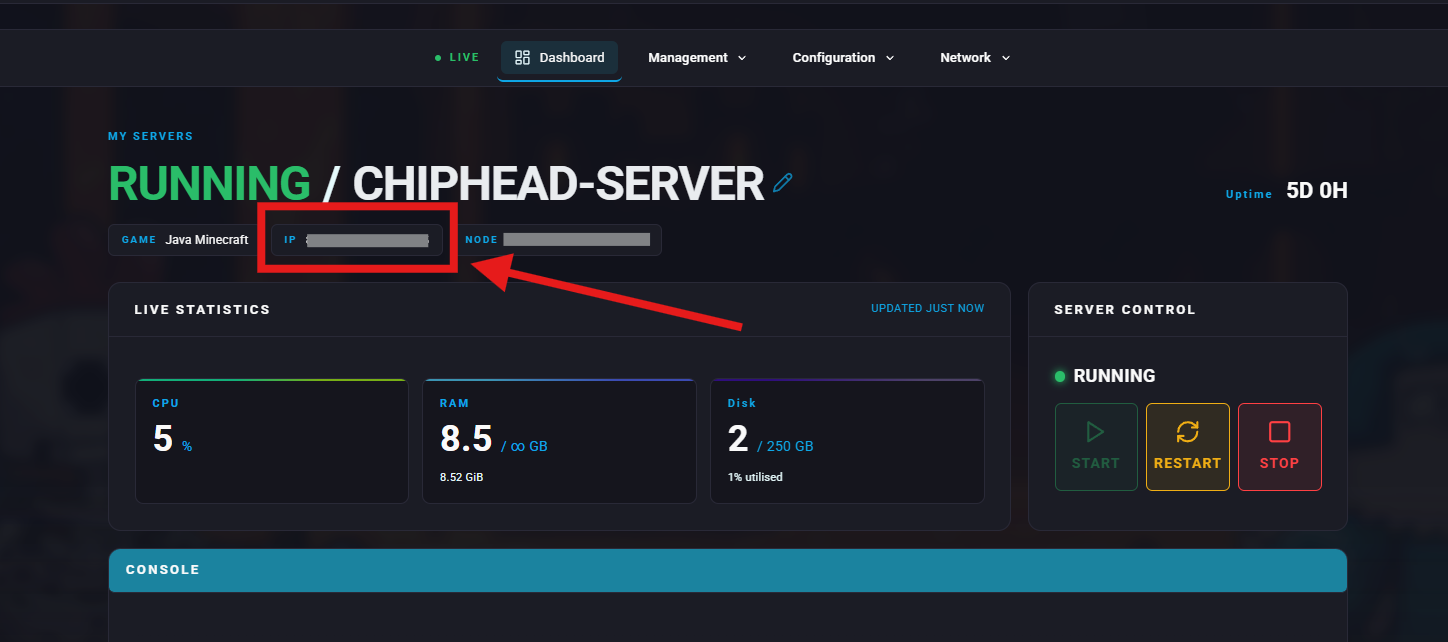
For example:192.168.2.1:12345
Server IP: 192.168.2.1
Port: 12345
How to Connect to a Pocket/Bedrock Edition Server
Open the Minecraft Bedrock Edition application.
Press the Play button.
Go to the Servers tab.
Click Add Server.
Enter the following information:
Server Name: Any name you want
Server Address: (Example:
192.168.2.1)Port: (Example:
12345)
Press Play to join instantly, or Save to keep the server on your list.
