In Rust, structures are usually maintained through a tool cupboard that consumes materials to repair damage from decay or attacks. For players who log in less often, this upkeep can drain resources quickly, so lowering the decay rate can help preserve materials. On the other hand, servers with high player turnover may benefit from increasing decay, allowing abandoned bases to clear out and make space for newcomers.
How to Adjust Building Decay on a Rust Server
Log in to the ChipHead Panel.

Stop the server.

Open the Startup.

In the Additional Arguments field, enter the following:
+decay.scale "value"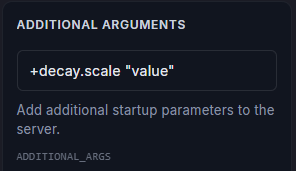

Note:
Setting the value to "2" doubles the decay rate, while "0.5" reduces it by half. Entering "0" disables decay entirely.
Setting the value to "2" doubles the decay rate, while "0.5" reduces it by half. Entering "0" disables decay entirely.
Start the server.