
Summary
Admin commands give Valheim server owners powerful tools for managing gameplay, player activity, and world settings. These commands can be used for tasks such as saving the world, banning or kicking players, enabling god mode, and much more.

You must be connected as a server administrator to run admin commands. Check out our guide on Adding Admins To Your Valheim Server.
Enabling the In-Game Console
Before you can use any commands, you’ll need to enable the in-game console and make sure you’re logged in as an admin.
Open your Steam Library.
Right-click on Valheim and select Properties.
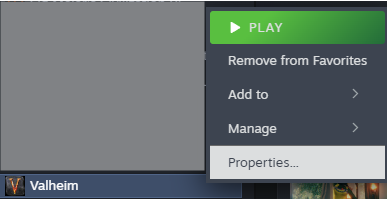
Under Launch Options (in the General tab), type the following:
-console Note:
Note:
The hyphen (-) must be included, or the command will not work.Launch Valheim to enable console access.
Using Admin Commands
Once your console is enabled and you’re connected as an admin, you can begin using commands in-game.
Join your ChipHead Valheim server with admin permissions.
Press F5 to open the in-game console.
Enter your chosen command and press Enter.
For example, entering “save” will force your server to save the world immediately.
There are many available commands for Valheim administrators — covering server management, gameplay controls, and player moderation. For a complete list, visit the official Valheim Wiki and view the Console Commands section.

By default, cheat commands are disabled on multiplayer servers. If you want to use developer or cheat commands, you’ll need to install the Server Devcommands plugin via BepInEx.